An 85-year-old Singapore retiree nearly transferred almost $110,000 after a fraudulent security pop-up led him to scammers posing as technical support and police. Two OCBC employees at the Marine Parade branch grew suspicious, alerted the bank’s anti-fraud team, and the account was frozen before funds left. Police later confirmed the callers were impostors; Jim returned to apologize, acknowledging that the staff had saved most of his life savings. Authorities warn that legitimate tech firms don’t include phone numbers in pop-up alerts and advise contacting banks or ScamShield (1799) if unsure.
Fake Security Pop-Up Nearly Cost 85-Year-Old His Life Savings — Two Bank Staff Stopped a $110,000 Scam
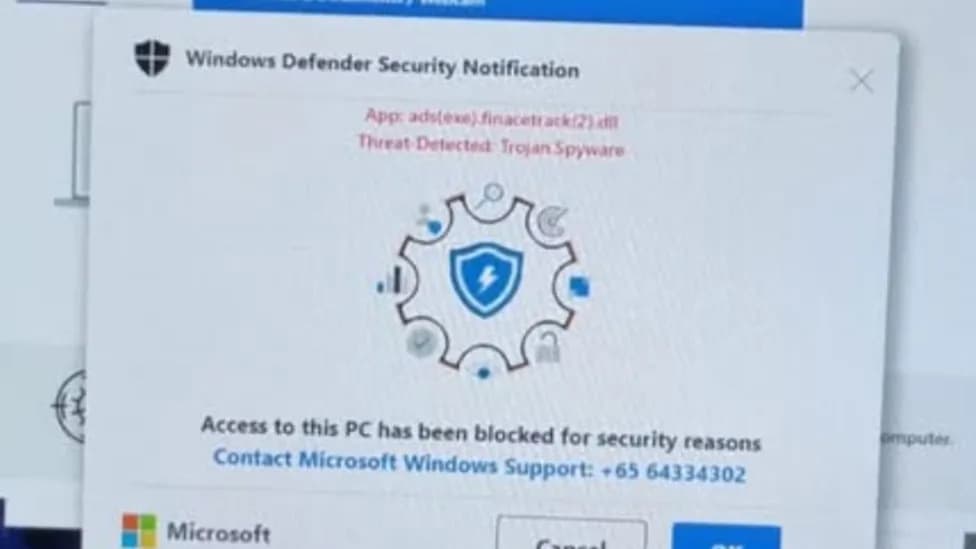
Image Credit: The Straits Times/Facebook.
An 85-year-old Singapore retiree, identified as Jim to protect his privacy, narrowly avoided losing nearly $110,000 after a fraudulent computer security pop-up led him to scammers posing as technical support and police.
While checking his email, Jim saw a browser pop-up claiming his computer had been blocked and displaying a phone number to call. The person who answered posed as technical support and then connected Jim to an impostor claiming to be a police officer. The fake officer told Jim his bank account had been used to move illicit funds and persuaded him that transferring his money to a “trap” account would help catch the culprit.
Because Jim uses a wheelchair, an assistant accompanied him to the OCBC Marine Parade branch to complete the transfer in person. At the counter he handed teller Robert Tan a note with the recipient’s name and account number and described the payee as a cousin. Tan noticed inconsistencies and became concerned when Jim insisted the transfer proceed without further questions.
Customer service officer Chai Mei Li brought Jim into a private room and discovered his account transaction limit had recently been raised from $3,000 to $200,000, which made the unusually large transfer possible. While Chai spoke with him, Jim continued to receive calls from the scammers asking whether the transfer had been completed.
When Chai warned Jim he was likely being scammed, he initially rejected her concerns and accused her of being fraudulent. After at least an hour, he left the branch saying he would try another way to make the payment. Suspecting the funds could still be diverted, Chai alerted OCBC’s anti-fraud team; the bank froze the account and contacted police before any money could leave.
Officers from the Singapore Police Force visited Jim’s home later that day and confirmed the callers were impostors. Jim returned to the branch the next day to apologize to both staff members and acknowledged that their vigilance had preserved most of his lifetime savings.
Wider Trend And Official Advice
The incident comes amid a sharp rise in technical-support scam losses in Singapore: reported losses increased from $769,000 in the first half of 2025 to $4.9 million in the same period of 2026, and reported cases rose from 33 to 49. Authorities have warned of a scam variant in which fake Microsoft alerts urge victims to call a support number and then hand them off to a second caller impersonating law enforcement.
ScamShield and Singapore Police guidance: Legitimate technology companies such as Microsoft and Apple do not send pop-up alerts that include phone numbers to call. Do not call numbers shown in unsolicited pop-ups, do not click links or buttons in suspicious alerts, and close the browser instead.
If a pop-up cannot be closed normally, Windows users are advised to use Task Manager to close the browser. Victims who followed a scammer’s instructions should disconnect the computer from the internet or power it down, remove any software installed at the caller’s direction, and run a full antivirus scan. Anyone who disclosed banking information or followed account-related instructions should contact their bank immediately to stop unauthorized transactions, change banking credentials from a separate trusted device, and remove unfamiliar payees.
The Singapore Police emphasize that government officials will not call or email and instruct someone to transfer money as part of an investigation. Singapore residents who are unsure about a request can call the 24-hour ScamShield helpline at 1799 before taking further action.
Help us improve.